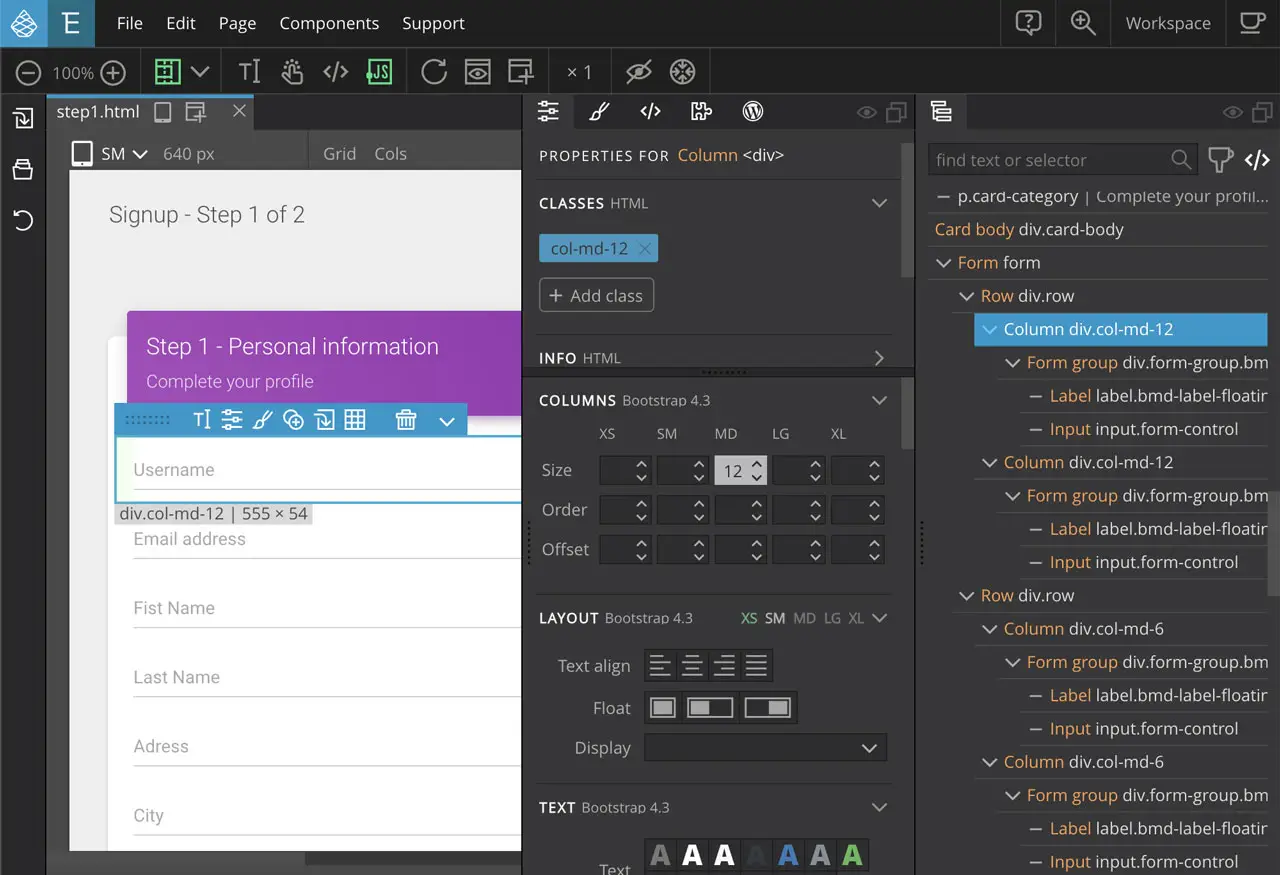
Pinegrow Overview
Pinegrow is a visual HTML and CSS editor built by Pinegrow Pte. Ltd. for designers and developers who work directly with standard web files instead of a proprietary format. Version 9.3, the current release, added a Reveal in Finder option, an AI image editor, and new start presets. It ships as two separate Mac downloads, one built for Apple Silicon and one for Intel, both checked with VirusTotal for safety. Pinegrow supports live SASS and LESS editing, a visual CSS Grid editor, Bootstrap and Foundation components, and an integrated WordPress Theme Builder for exporting production-ready themes. A free trial is included with every download, and licenses are available as either a one-time purchase or a yearly subscription.
Why Choose Pinegrow for Mac?
Most visual website builders lock your project into their own format, so leaving the tool later means starting over. Pinegrow works directly with standard HTML, CSS, SASS, and LESS files, so what you build stays usable with any other editor or workflow, including version control tools like Git.
Its built-in WordPress Theme Builder is a genuine differentiator: you can design a page visually, then assign WordPress actions to individual elements to export it as a complete, production-ready theme with standard PHP files, all without leaving Pinegrow. The Mac version also comes as two distinct downloads, one built specifically for Apple Silicon and one for Intel, rather than a single combined installer, so it's worth grabbing the one that matches your Mac's chip.
Key Features
- Visual HTML editing with drag-and-drop element placement
- Live SASS and LESS editing with no external compiling tools needed
- Visual CSS Grid editor alongside standard CSS rule editing
- Bootstrap and Foundation component libraries with visual controls
- Tailwind Visual Editor add-on for working with Tailwind CSS projects
- Integrated WordPress Theme Builder for exporting production-ready themes
- Multi-page, multi-device responsive editing with live style syncing
- Pinegrow Interactions add-on for GSAP-powered animations and scroll scenes
- Built-in AI Assistant with support for your own API key and multiple providers
- Compatibility with coding agents like Claude Code and Codex CLI
What's New in 9.3 Version
Pinegrow 9.3 focuses on file management and AI-assisted design. Recent changes include:
- A Reveal File in Finder option for quickly locating project files
- A new AI Image Editor for adjusting images without leaving the app
- New Start presets for beginning projects faster
- WordPress Theme Builder improvements
- General bug fixes across the editor
- These updates build on 9.2's redesigned page tabs and improved text editing, continuing Pinegrow's frequent, incremental release pace.
Supported macOS Versions
Pinegrow for Mac is distributed as two separate installers rather than one universal binary: a dedicated build for Apple Silicon Macs and a separate one for Intel Macs. Both versions are checked with VirusTotal before release, and each comes with a free trial so you can confirm compatibility before purchasing a license.
How to Install Pinegrow on macOS?
Setting up Pinegrow on your Mac takes just a few steps.
- Download the version of Pinegrow for Mac that matches your chip, Apple Silicon or Intel.
- Open the downloaded disk image (.dmg) file.
- Drag the Pinegrow icon into your Applications folder.
- Launch Pinegrow from your Applications folder.
- Start the free trial or activate your license when prompted.
- Once installed, you can open an existing HTML project or start a new one right away.
How to Use Pinegrow?
- Open Pinegrow and create a new project, or open an existing HTML folder.
- Use the visual tools to add, edit, and arrange HTML elements on the page.
- Style your page using the CSS panel, SASS, or LESS, with live updates.
- Use Bootstrap, Foundation, or Tailwind components if your project uses them.
- Assign WordPress actions to elements if you're building a theme for export.
- Preview your responsive layout across multiple device sizes before saving.
Final Verdict
Pinegrow stands out by working directly with standard web files instead of locking your project into a proprietary format, while still offering genuinely useful visual tools for HTML, CSS, Bootstrap, and Tailwind. Its integrated WordPress Theme Builder and AI Assistant push it beyond a basic visual editor, and the flexible one-time or subscription licensing lets you choose what fits your workflow. For designers and developers who want visual tools without giving up direct access to their code, Pinegrow remains a strong option on Mac.
Download Pinegrow for Mac Latest Version
Ready to build websites visually without giving up direct access to your code?
Download Pinegrow for Mac to design HTML and CSS visually, style with live SASS and LESS editing, and export production-ready WordPress themes, all from one app. Whether you're building a client website, a WordPress theme, or a Tailwind CSS project, Pinegrow gives you visual tools that work with your existing files instead of locking you into a new format.